Native iOS & macOS App

Your AI just got
its senses.

CARAPACE gives your OpenClaw agent sight, voice, and presence — through your iPhone and the world around you. Point, speak, and let your AI actually experience what you do.

CARAPACE on Mac — Chat CARAPACE on Mac — Conversation CARAPACE on Mac — Projects CARAPACE on Mac — Settings
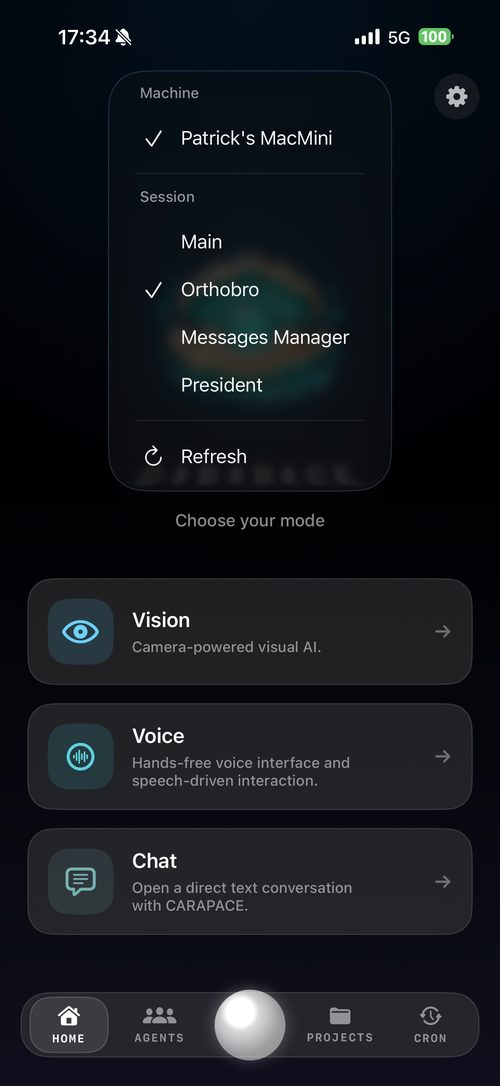
Home Agents Vision Chat Cron Projects

Features

Everything you need.
Nothing you don't.

Native on Every Device

Built with SwiftUI for iPhone and Mac. Not a web wrapper — a real app that feels right at home on every Apple device.

Live Agent Monitoring

Watch your agents think in real-time. Monitor token usage, subagent trees, active sessions, and kill runaway processes with a tap.

Zero-Trust Security

Encrypted end-to-end. No cloud relay, no data leaves your mesh. Pair via QR code, connect over Tailscale or direct TLS.

Coming Soon

Push Notifications

Get alerted when agents need attention, tasks complete, cron jobs fire, or your gateway status changes. Never miss a beat.

Eyes — Live Vision

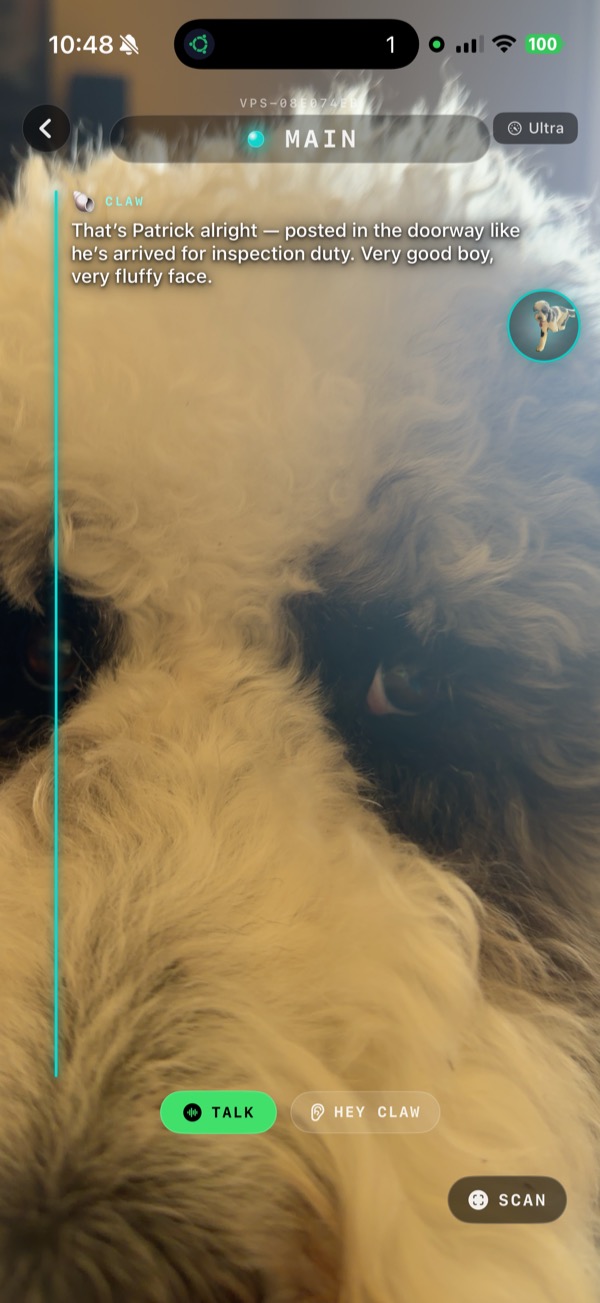
Point your camera at anything — your AI sees it in real time. Ask questions, get analysis, read documents, identify objects. Your agent goes eyes-on with you.

Dedicated Voice Mode

A full hands-free voice interface built for real use — driving, cooking, working. Talk naturally, get spoken responses.

Vision analysis routes through Gemini Flash first — fast, cheap, and on-device enough to handle most requests without touching your OpenClaw agent. Only escalates when it needs to. Fully editable Gemini base prompt in-app so you control exactly when and how it escalates.

Projects & Cron Jobs

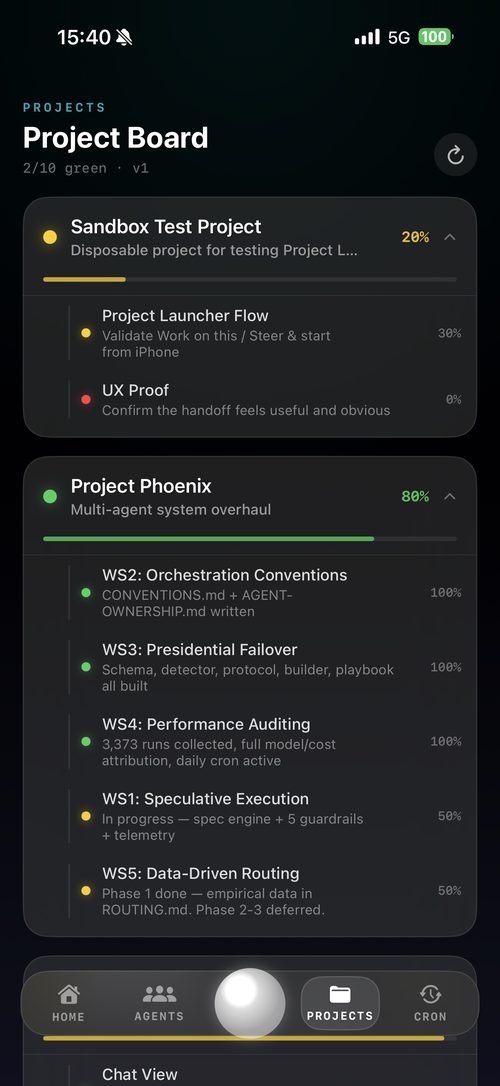
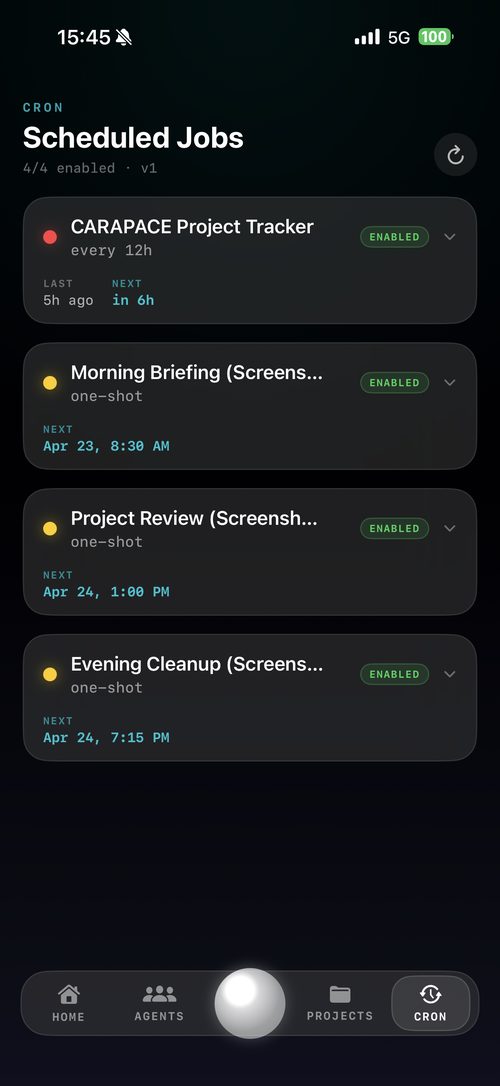
See every active project and scheduled job in one view. Track workstreams, completion percentages, and what’s running in the background — without opening a terminal.

Eyes

Sight, voice, presence.
All through your phone.

CARAPACE Eyes gives your OpenClaw agent a live view through your iPhone camera. Hold it up, ask a question, and your AI sees exactly what you see — in real time. No uploads, no delays. Just point and ask.

Real-Time Camera Feed
Your agent sees through your camera live. Read labels, analyze paperwork, identify parts, interpret X-rays — whatever’s in front of you.
Voice + Vision Together
Talk while your agent watches. Describe what you need, ask follow-up questions, get spoken responses. Hands-free intelligence.
Smart Escalation — Fast and Cheap by Default
Vision data hits Gemini Flash first — instant, low-cost. Only escalates to your OpenClaw agent when it actually needs to. You control the escalation logic with an editable base prompt right inside the app.
CARAPACE Eyes
CARAPACE Eyes
AI sees what you see
📱
CARAPACE
CONNECTED
🖥️
Mac mini
● Home · 4ms
☁️
VPS
● Cloud · 38ms
🥧
Raspberry Pi
● Office · 2ms
🔒 Encrypted via Tailscale

Multi-Gateway Control

One app.
Every gateway.

Deploy OpenClaw instances across your Tailscale mesh — at home, in the cloud, on a Pi at the office — and control them all from one interface. CARAPACE is your unified control plane.

Instant Switching
Tap to switch between gateways. Saved profiles mean zero reconfiguration.
QR Code Pairing
Scan once to pair. Cryptographic trust, no passwords to remember.
Zero Cloud Dependency
All traffic encrypted peer-to-peer via WireGuard. No relay servers, no third-party cloud.
Coming Soon — Pending App Store Approval

CARAPACE for
Meta Glasses

Imagine your AI agent living in your glasses. No phone in hand. No screen to look at. Just you, the world, and an AI that sees everything you do.

We’ve built the Meta wearables SDK integration. It’s ready. We’re awaiting Meta’s SDK approval to ship it through the App Store. In the meantime — we’re giving beta access to our first 500 iOS users.

👓

Always-On Context

Your AI sees through your glasses continuously. No activation, no unlock. It’s just there.

🎙️

Whisper-to-Agent

Talk quietly. Your agent listens, processes through your OpenClaw gateway, and responds in your ear.

🔒

Still Your Data

Everything routes through your private OpenClaw gateway. Meta doesn’t see your conversations.

📦 Early Beta Access

First 500 iOS buyers get in.

Purchase CARAPACE on the App Store and you’re on the list. We’ll send your TestFlight invite for the Meta glasses beta the moment it’s ready.

No extra cost. No sign-up required. Just buy the app.

Get on the list — buy on
App Store — $1.99
Spots limited to 500.
Currently open.

Beta availability subject to Meta SDK approval. TestFlight invites will be distributed in purchase order.

Projects & Cron

Stay organized.
Actually get things done.

Every active project and scheduled job, surfaced in one place. Track workstreams, completion percentages, and what's running in the background — without ever opening a terminal.

Project Board
Track every workstream with completion percentages, subtask health, and at-a-glance status. Know exactly where each project stands.
Scheduled Jobs
See every cron job, when it last ran, when it runs next, and whether it's healthy. Your entire automation schedule in one view.
No Terminal Required
Your agent runs in the background — check in from anywhere, anytime. Everything important surfaces automatically.
CARAPACE Projects
Projects
CARAPACE Cron Jobs
Scheduled Jobs

Getting Started

Up and running
in three steps.

1

Install CARAPACE

Download from the App Store or Mac App Store. Native, lightweight, no dependencies.

2

Scan to Pair

Scan the QR code from your OpenClaw gateway. Cryptographic pairing in seconds.

3

Take Control

Monitor agents, chat with your AI, manage skills — from anywhere on your mesh.

Setup Guide

Fresh Mac to live gateway
in about 3 minutes. (unless you're on dial-up)

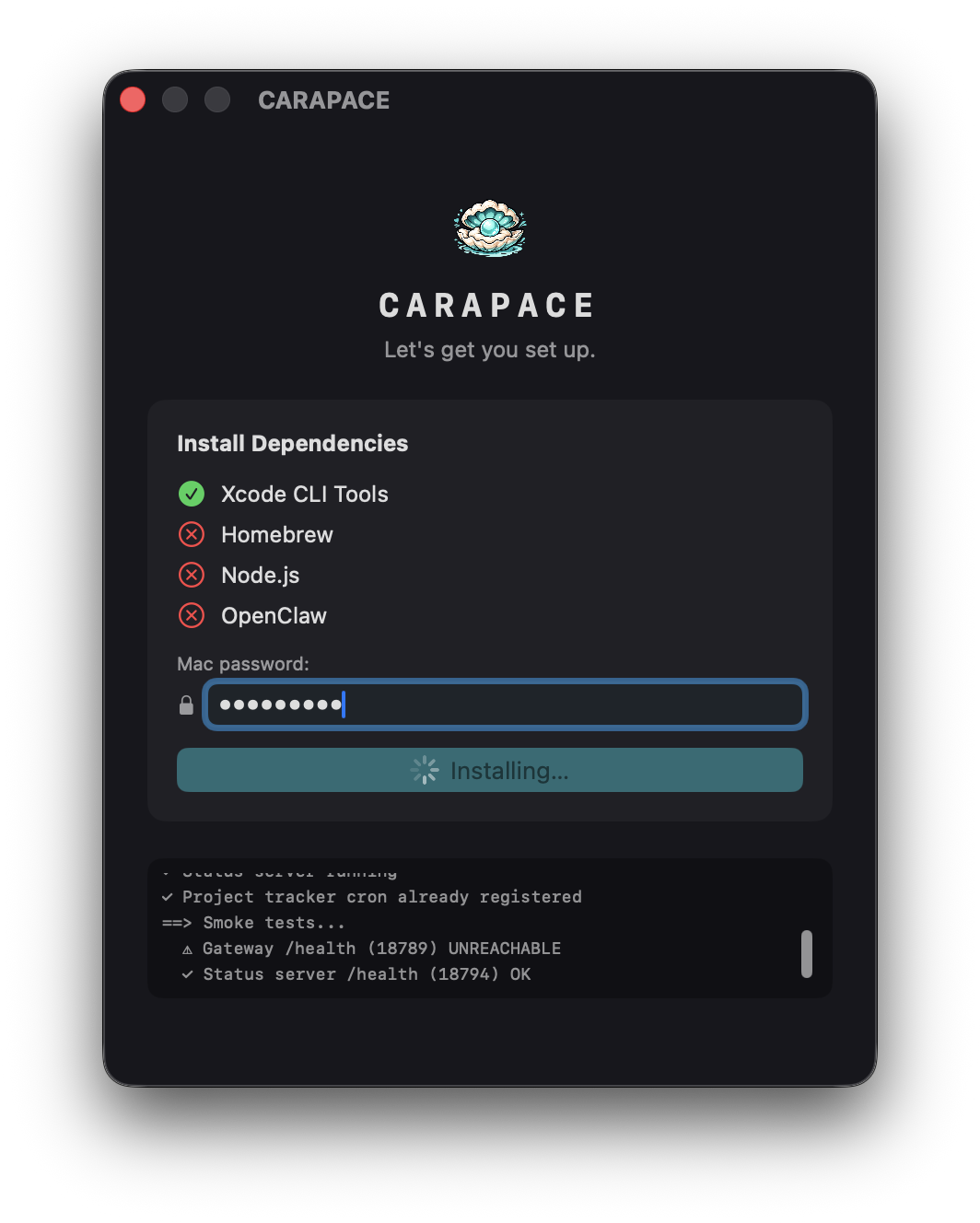
Tired of installing OpenClaw for your friends and family? We got you. CARAPACE walks you through everything — OpenClaw, Tailscale, pairing — right inside the app. No terminal required.

1

Download CARAPACE on Mac

Open the app and hit “Set up a gateway.” The built-in wizard takes it from there — it installs OpenClaw, configures it to run in the background, and handles the heavy lifting automatically.

2

Connect securely with Tailscale

CARAPACE prompts you to install Tailscale and walks you through enabling HTTPS. This is what lets your phone reach your Mac from anywhere — at home, on LTE, or halfway around the world — without opening a single firewall port.

3

Scan the QR code on your iPhone

The Mac app generates a pairing code. Open CARAPACE on your iPhone, scan it, and you’re live. No passwords, no config files, no guesswork.

You’re in.

Your iPhone talks directly to your Mac over an encrypted private network. No relay servers. No third-party cloud. Just your devices, your agents, your data.

✓ End-to-end encrypted ✓ No cloud dependency ✓ Works anywhere

If something’s not working

Can’t connect?
Make sure Tailscale is running on both devices and they can see each other. The CARAPACE setup wizard has a built-in connectivity check that catches most issues automatically.
HTTPS not enabled?
The wizard links you directly to the Tailscale dashboard to enable it. One toggle, takes 30 seconds. Then re-run the wizard and it picks up where it left off.
Adding more gateways?
Run the pairing flow on each machine. CARAPACE saves named profiles for all your gateways — switch between your Mac, a VPS, or a Pi with one tap.
Still stuck?
Reach out at [email protected] — we’re a small team and we actually reply.

Pricing

Simple, honest pricing

No hidden fees. No usage limits. No cloud subscriptions. Just the app and your gateway.

Mac

macOS Ventura+

Most Powerful
$5.99 /month
Free 7-day trial
Everything in iOS
Menubar quick access
Multi-window & keyboard shortcuts
Advanced debugging & log viewer
Desktop notifications & widgets
Download v4.1.0 — macOS
CARAPACE

Your AI. Your rules.
Your pocket.

Download CARAPACE and connect to your OpenClaw gateway in under a minute.

End-to-end encrypted No cloud dependency Built with SwiftUI

What's Coming

This is just the beginning.

CARAPACE is shipping fast. Here’s what’s already built and what’s coming next.

Coming Soon

Cron Job Editor

Create, edit, and manage scheduled jobs directly from your phone. Set it, forget it, get notified when it runs.

🧠 Coming Soon

Smart Project Steering

AI-suggested prompts based on where your project is right now. Jump back in with one tap — CARAPACE knows what question to ask next.

🖖 Coming Soon

Force Touch to Focus

Hard press any project to instantly steer your agent’s full attention to it. No typing, no context switching — just press and go.

🔔 Coming Soon

Push Notifications

Get alerted when tasks complete, cron jobs fire, or your agent needs attention. Stay in the loop without staying in the app.

👓 Pending Approval

Meta Glasses — Full Integration

Already built. Awaiting Meta SDK App Store approval. First 500 iOS buyers get TestFlight beta access the moment it clears.

📱 Planned

Home Screen Widgets

Project health, active agents, and next scheduled job — visible at a glance without opening the app.

📊 Planned

Usage & Cost Tracking

See token spend, cost per session, and model breakdown right in the app. Know exactly what your AI is costing you in real time.

📜 Planned

Session History Browser

Scroll back through past conversations across all your gateways. Search, resume, or reference anything your agent has done.

🟢 Planned

Gateway Health & Uptime

Uptime graph, response time history, and instant alerts when a gateway goes offline. Full visibility into your mesh health.